Most schools that end up with the wrong digital hall pass system did not choose badly. They just didn’t ask the right questions before they signed.
The demo looks good. The platform syncs with your district’s SIS. The price fits the budget. Then the school goes live, teachers stop using it by November, and admins are back to clipboards and spreadsheets by spring.
This guide is for school and district admins who want to avoid that. It covers the questions worth asking in writing before you commit, what the answers should tell you, and the red flags worth walking away from.
What Questions Should Districts Ask When Evaluating a Digital Hall Pass System?
Most vendor evaluations focus on features. The better evaluation focuses on fit: does this platform match how your school actually operates, and will it still be working six months after launch?
Six categories of questions get you there.
1. How does the approval workflow actually work?
This is the question that determines teacher adoption. Ask the vendor to walk you through the exact steps a student takes to request a pass and the exact steps a teacher takes to approve it. Count the clicks. If a teacher has to stop their lesson for more than five seconds, the system is a hurdle. This leads to workarounds, which means the system quietly dies.
Look for a student-led workflow where the student initiates the request, and the teacher approves with a single tap from whatever device they are already using. The My Class dashboard is what this looks like in practice: pass requests, approvals, and hallway visibility all in one browser tab without interrupting instruction.
2. Does it connect to our SIS, and is that included?
Almost every vendor claims SIS integration. The follow-up questions matter more. Ask specifically which SIS systems they connect to by name, and which require custom integration work. If your SIS is on the “custom” list, plan for an extra four to six weeks of setup. Ask whether the SIS connector is included in the base price or billed separately. MingaSync handles SIS rostering automatically and supports Clever, ClassLink, Synergy, Aeries, Infinite Campus, PowerSchool, Focus, Google, and Microsoft.
3. What happens to students who don’t have a device?
A platform that only works on student-owned phones has already, by design, excluded part of your student body. Ask how the vendor handles phone bans, 1:1 gaps, and shared-device environments. For schools on Chromebooks, the answer should be browser-based with no app install required and single sign-on through Google or Clever. For shared-device classrooms, Kiosk Mode should be an option: a tablet at the front of the room that students sign out from without needing a personal device. For teacher-managed classrooms, My Class lets teachers issue passes directly without any student device at all. If a vendor cannot support at least two of these three scenarios, the platform will create equity gaps at your school.
4. What does the reporting actually show us?
Every vendor will say “robust reporting.” Ask them to show you specifically:
- Which students have the most passes this week
- Which destinations are most congested during which periods
- And which teachers are issuing significantly more or fewer passes than their peers.
These three views are the minimum for running a data-driven hallway management strategy. If the demo shows you a summary dashboard but cannot drill down into individual patterns, the reporting is decorative, not operational.
5. How does it handle repeat offenders and meetup prevention?
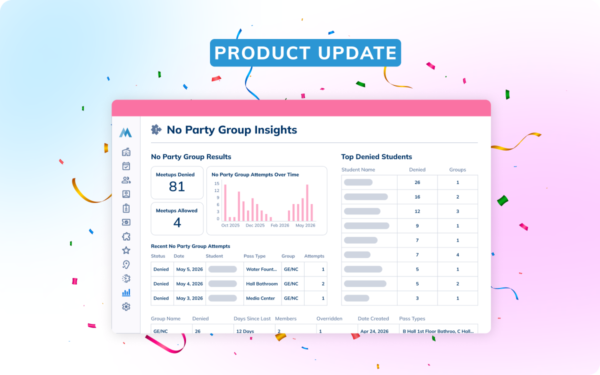
This is where basic digital hall pass tools and a genuine hallway management system diverge. Ask specifically: what happens when the same three students keep signing out to the same bathroom at the same time? A basic tool logs it. A management system lets you act on it. No Party Groups let administrators flag specific students so that when one member of the group has an active pass, the system automatically blocks the others from leaving class at the same time. The meetup never happens. No staff intervention required.
6. What does implementation actually look like, and who supports us after we go live?
Ask for a week-by-week breakdown of the onboarding process, not a general “we’ll get you set up” answer. Ask what training is provided, who delivers it, and what happens when a teacher has a problem on a Tuesday afternoon in October. Get a clear understanding of support response time commitments. Minga can have schools live in two weeks and provides dedicated onboarding, hands-on training, and ongoing support throughout the year. This is what we call “we don’t launch and leave,” because you deserve better than that.
Red Flags: How to Spot a Hall Pass Platform That Will Disappoint You
Six warning signs come up consistently in district debriefs after a hall pass rollout fails.
1. No willingness to discuss pricing structure, even on a call
A legitimate vendor should walk you through tiers, what’s included, and what’s billed separately the moment you’re in a real conversation. Minga’s pricing is organized into three tiers: Basic, Plus, and Premium, and the team will walk you through the specifics on a demo call matched to your enrollment and setup. A vendor who stays vague even in that context is hiding something.
2. No public case studies with specific stats
Marketing copy with vague claims is not the same as a named principal saying tardies dropped significantly in one semester at their school. If a vendor has been in the market for three years and cannot produce case studies with school names and real numbers, ask why.
At Montgomery County High School in Kentucky, Principal Holly Lawson reduced tardies from 100 per day to 6 and recovered 24 extra hours of classroom time in a single year. At Danbury High School in Connecticut, Assistant Principal Andrew Lambo recovered 2,431 hours of classroom time and reduced hallway time by 9% in a single semester. Those are the kinds of numbers worth asking a vendor to match.
3. Ask how they connect to your specific SIS, not just whether they integrate
Most platforms support the major SIS providers, but the depth of that integration varies. Ask whether your SIS connects via a direct API sync or requires a more manual setup process, and what the realistic timeline looks like either way. A vendor who is upfront about this is a vendor you can plan around. Vague claims of “full SIS integration” without specifics are worth pushing on before you sign.
4. No structured onboarding plan before you go live
A vendor who hands you a help center link and calls it implementation has not thought seriously about adoption. Ask what the onboarding process looks like week by week, who owns it on the vendor side, and what happens if teachers aren’t using the system a month after launch. The go-live date is not the finish line, it’s the starting line.
5. Get a clear idea of support commitments
Ask specifically what the vendor’s documented response time Service Level Agreement (SLA) is for teacher-facing issues during the school day, and whether that varies by plan. A platform that can commit to responding within 24 hours, and faster for schools that need it, is one that takes support seriously. If the answer is “we’ll do our best,” that is not an SLA.
6. No clear answer on data privacy and FERPA compliance.
A digital hall pass creates student movement records that fall under FERPA the moment they’re tied to an identifiable student. Ask the vendor directly: are you FERPA compliant, will you sign our data privacy agreement, and who owns the data at contract end? If the answer to any of those is vague, that is your answer.
What’s the Difference Between a Basic Digital Hall Pass and a Full Hallway Management System?
This is the underlying question behind most vendor evaluations, even when it is not stated directly.
A basic digital hall pass replaces the paper slip. It logs who left, when, and where they said they were going. That is useful. It is also the floor, not the ceiling.
A hallway management system does what a basic tool cannot: it enforces limits automatically, surfaces patterns in student movement, connects hall pass data to tardies and behavior, and gives administrators the visibility to intervene before problems compound rather than after. The full comparison is in the buyer’s guide, but the short version is this:
If you can see that your hallways are chaotic but the platform gives you no tools to change that, you have a basic tool. If the platform tells you which students, which periods, and which destinations are driving the problem, and lets you act on that automatically, you have a hallway management system.
The distinction matters most at the moment a student’s pass frequency starts climbing alongside their tardies and behavior referrals. A basic tool has no way to connect those dots. A platform built around the whole student picture surfaces that pattern weeks before it becomes a crisis, giving a counselor, principal, or AP the notice they need to actually help.
How Can Schools Involve Students in the Rollout of a New Hall Pass System So They Buy In?
The rollout work matters more than the platform choice. A great platform deployed without student input lands worse than a mediocre platform deployed well.
Week 1: Assemble a student advisory group. Five to eight students. Mix grades. Mix social groups. Intentionally include a few students who will be skeptical. The kids on student council are not the only voices that matter.
Weeks 2-3: Surface their objections. Two or three sessions, thirty minutes each. Show them the platform. Ask what they hate about the current system. Ask what they expect to hate about the new one. Write down every objection.
Week 4: Change two settings based on feedback. This is the make-or-break step. The advisory group needs to see that their feedback changed the configuration. Two changes is enough; you do not need to overhaul the platform.
Week 5: Advisory group goes live early. They use the system for two weeks before everyone else. They find the remaining bugs. They learn the workflow. They become the first student voices who can answer questions.
Week 6: Full rollout, with the advisory group as built-in support. When other students complain in the first week, the advisory group explains the system to them. Peer-to-peer adoption moves faster than top-down rollouts every time.
The right hall pass system is one that students will actually use, and one that tells you something useful when they do. If you’re ready to go deeper on what to look for in a platform, the full buyer’s guide walks through every feature worth evaluating before you make a decision.
Ready to Strengthen Student Engagement Across Your School?
Book a demo today and start building a more connected school community.