Most schools that reach out to us about tardies aren’t asking whether they need a better system. They already know they do. What they’re asking is whether it’s actually possible to get the front-desk line under control without hiring more staff, changing their SIS, or putting their attendance clerk through another round of retraining.
The answer is yes. And it’s faster to set up than most schools expect.
How Can a School Let Students Scan In for Tardies or Arrivals Instead of Waiting at the Front Desk?
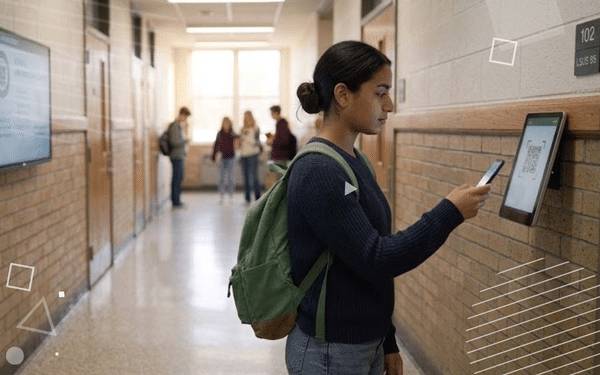
A student arrives late. Instead of joining a line at the front desk, they scan their digital ID at a kiosk or a staff-held device near the door. The system logs the tardy automatically, timestamps it, and generates a digital hall pass to their first-period class. The student goes straight to class. The whole interaction takes under thirty seconds. Nobody writes anything down.
Minga’s Tardy Management powers this workflow. At Sanger West High School in California, attendance staff use Minga daily for morning tardies. At Montgomery County High School in Kentucky, Principal Holly Lawson moved from 100 tardies per day to 6 by April, with 416 automated tardy referrals logged over the year. The workflow that made that possible is the same one described above: scan in, hall pass generated, parent notified, consequence triggered. No manual steps in between.
Kiosk Mode is the version for schools where students check themselves in without staff assistance. A shared device near the entrance or at the front of each classroom. Students scan or tap their ID. The tardy is logged. No staff required at that point in the workflow.
The kiosk also solves the substitute teacher problem. When a sub doesn’t know the system, students can still check in on their own. The data stays intact.
What Software Can Automate Tardy Slips and Consequences Instead of Using Paper Forms?
A lot of tools digitize part of the tardy workflow. They might replace the paper slip with a digital log. Or send a parent notification. Or track tardies in a dashboard. But most stop short of automating what happens after the tardy is logged. Staff still have to follow up. Consequences still have to be manually triggered. The loop isn’t closed.
Minga’s Tardy Management closes the full loop. Here’s the complete chain:
Step 1: Capture. The student scans in at the door. The tardy is logged instantly with a timestamp. This works at the front office, at a classroom kiosk, or via a staff device during a passing period.
Step 2: Auto hall pass. The moment the tardy is logged, a digital hall pass to the student’s next class generates automatically. The student goes straight to class without stopping at the front desk.
Step 3: Parent notification. The parent or guardian receives an automatic notification the moment the tardy is logged. The parent hears about it the same day, not at the end of the week when someone has time to call.
Step 4: Progressive consequences. Minga applies consequences based on the school’s own progressive-discipline policy. When a student hits their third tardy, the threshold triggers automatically. A detention notice goes out. A warning is issued. An administrator is flagged. Whatever the school’s policy says happens, the system makes it happen, consistently, every time, for every student.
Step 5: Data back to the SIS. Minga writes tardy data back to your existing SIS via a scheduled SFTP report or daily CSV. For PowerSchool schools, there’s a step-by-step guide for syncing tardy data directly. Your system of record stays current without manual re-entry.
That’s the full chain. Every step automated. No chasing the consequence list at the end of the day.
For a head-to-head look at how Minga compares to another popular tardy platform, see Minga vs. SchoolMint Hero.
Why Most Tardy Management Systems Still Leave Staff in the Loop
Point solution tardy tools are a step forward from SIS-only workflows. They typically automate the logging and sometimes the notification. But most leave at least one link in the chain requiring staff action.
The most common gap: consequence follow-through. A tool might flag when a student has hit their third tardy. But then a staff member has to issue the detention, notify the parent, and log the consequence manually. The system identified the problem. The staff still have to solve it.
The second common gap: passing-period tardies. Most purpose-built tools focus on the morning arrival. Students who are late returning from a passing period, or who skip class mid-day, often don’t get captured at all. SIS platforms miss this entirely because the capture depends on manual entry.
Most tardy systems are set up to handle students who arrive late at the start of the day. But students can also be late coming back from a passing period at 9:57 AM, or after lunch, or between any class. A lot of tools miss those mid-day tardies entirely.
Which K-12 Platforms Offer Both Behavior Management and Tardy Management Tools Together?
Several platforms show up in K-12 tardy management conversations. Most do one part of the job well.
PowerSchool, Infinite Campus, and Skyward are the dominant SIS platforms in large public districts. They’re strong systems of record for attendance data. They’re not built to automate the workflow at the point of capture. The tardy still gets entered by staff. The consequence still gets issued manually.
ClassDojo handles simple attendance logging and family communication, primarily for elementary schools. It’s not designed for the progressive-consequence workflow that middle and high schools need.
What none of these platforms do is connect tardy capture, behavior management, and parent notification in a single automated chain.
Minga does. When a student hits their third tardy, the threshold triggers automatically, the behavior record updates, the consequence applies, and the parent is notified, before the student reaches their classroom. A student with five tardies in two weeks and three behavior referrals in the same window is showing a pattern that’s obvious when the data lives together and invisible when it doesn’t. Minga surfaces that picture without anyone running two separate reports and comparing them by hand.
Midland Legacy High School in Texas manages tardies, behavior, digital IDs, hall passes, and events on a single platform across 2,700+ students. The operational case for consolidation is efficiency. The student support case is visibility. Both show up in the data.
For more on how schools are consolidating to fewer tools without losing capability, see Tech Consolidation: How K-12 Schools Are Achieving More, with Less.
The schools getting the best results from tardy management aren’t the ones with the strictest policies. They’re the ones where the workflow is tight enough that the policy actually runs the way it was written, every morning, for every student, without anyone having to chase it. That’s what automation gives you. Not a stricter rule. A rule that enforces itself.
Schools can be live in two weeks. Minga runs alongside your existing SIS — no replacement, no data migration. Get a Demo
Frequently Asked Questions
- How can a school let students scan in for tardies or arrivals instead of waiting at the front desk? Set up an ID scan check-in at the door. Minga’s Check In technology lets students scan a digital ID at a kiosk or staff device the moment they arrive. The tardy is logged automatically, a hall pass to class generates instantly, and the student goes straight to class. No line, no slip, no staff required at the point of check-in.
- What software can automate tardy slips and consequences instead of using paper forms? Software that closes the full chain: capture, parent notification, progressive consequences, and data back to the SIS. Minga’s Tardy Management automates all five steps. The student scans in, the parent is notified instantly, the consequence triggers based on the school’s policy, and the data writes back to the SIS via scheduled SFTP or daily CSV.
- Which K-12 platforms offer both digital IDs and tardy management tools together? Very few offer both natively. Minga does. The same digital ID a student uses for the tardy scan at the front door is the credential they use for hall passes, events, lunch, and the library. Midland Legacy High School (2,700+ students) runs both Digital IDs and Tardy Management on Minga, managing 12,000+ event attendees and reducing tardies on the same platform.
- Does Minga replace our SIS? No. Minga runs alongside your existing SIS. Tardy data captured by Minga writes back to your SIS via a scheduled SFTP report or daily CSV. Your system of record stays current. Minga fills the workflow gaps the SIS wasn’t built to handle. For PowerSchool schools, there’s a dedicated step-by-step guide for syncing tardy data.