An MTSS coordinator opens the flex period roster on a Wednesday afternoon and finds the usual gaps. A handful of students never signed up for anything. A few who really need Tier 2 reading support have ended up in math once again; it’s a game of chess getting students in the sessions they actually needed. And there’s no easy way to tell, without emailing every teacher individually, whether the students who most needed to be in a session actually showed up.
None of this is a scheduling problem. The gap is in what happens after the schedule exists: making sure the right student ends up in the right activity, not just any activity, and that nobody slips through in between.
That’s a much harder problem than building a calendar, and it’s the one that actually determines whether Intervention & Enrichment works. A flex period schedule can be built perfectly and still fail the students who need it most, if getting them into the right session depends on sign-ups happening on time, seats being protected manually, and someone noticing when they aren’t.
Flex Periods Work Best When Placements Are Intentional
A flex period can be built around exactly the right support: a reading intervention block, a small-group math session, an enrichment activity a student’s been asking for. But none of that matters if the student who needs the reading intervention ends up somewhere else, or ends up nowhere at all.
Placement isn’t a detail underneath the intervention strategy. It is the intervention strategy. A school can have the right activities, the right teachers, and the right intentions. But it can still miss the mark entirely if the coordination that connects students to those activities relies on manual follow-up every single period.
The Four Moments When a Student Can Fall Through
There are four distinct points in the enrollment lifecycle where a student can end up in the wrong place, or no place at all:
- They miss the news that registration is open
- A student who needs a specific intervention, math support, for example, ends up in an unrelated activity instead
- They simply never sign up for anything
- Their classroom teacher has no visibility into where they landed and can’t catch the gap
Fixing coordination means addressing all four, not just one. That’s where Minga’s Intervention & Enrichment Solution comes into play. We handle not only the scheduling, but also provide all the tools you need to help get students connected to the right support.
Getting the Word Out: Period Notifications
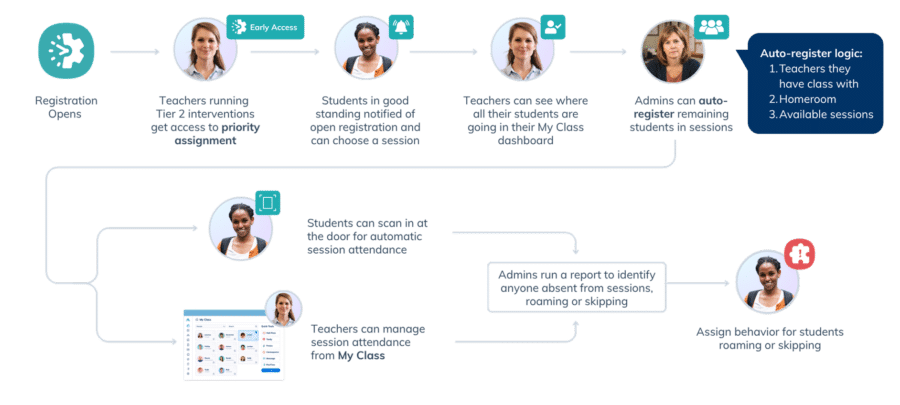
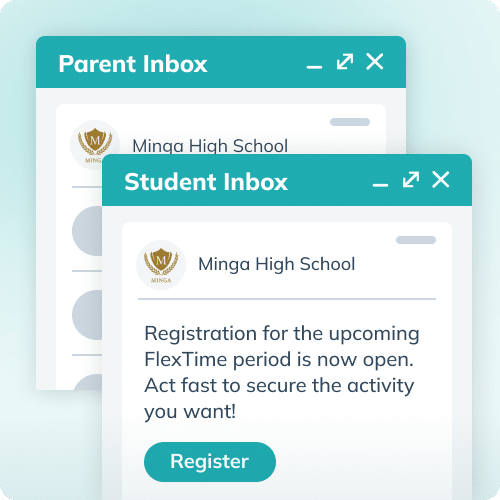
The earliest point where placement can break down is also the simplest to fix: a student doesn’t know registration is open, or it opens and closes before they notice. Minga’s Period Notifications automatically alert students and parents when a flex period registration window opens, prompting students to sign up while giving parents a nudge to encourage it.
This is a communication fix, not a behavior fix. Most students who don’t register aren’t avoiding it; they just didn’t know it was time. Getting ahead of that with a simple, automatic nudge means more students choose an activity themselves, before any other workflow needs to step in.
Making Sure the Right Student Gets the Right Support: Priority Assignments
A student who needs support in one subject often needs support in more than one. Math intervention on Tuesday, English on Thursday, for example. Coordinating that across a whole school has always been hard to manage by hand.
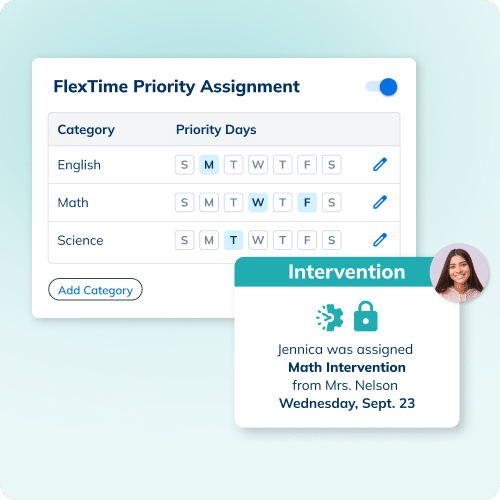
With Priority Assignments, admins designate certain flex activity categories as priority on specific days. On those days, teachers running Tier 2 intervention sessions become drafters, with the ability to lock students into their session, even moving them out of a different activity if needed.
This gives admins a way to coordinate overlapping interventions across the whole school, instead of managing each subject’s placements in isolation. Admins set the structure once, and Minga enforces it every week.
Catching Whoever’s Left: Automated Registration
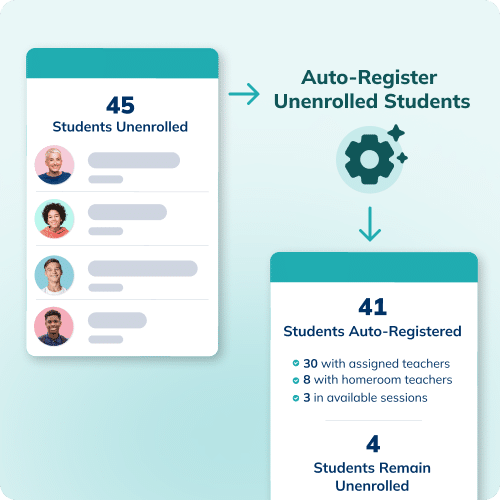
Even with notifications going out and priority seats protected, there are always a few students who haven’t signed up for anything by the time a flex period starts. Automated Registration sweeps for anyone still unenrolled and places them in an available activity, prioritizing sessions run by a teacher the student already has class with, then their homeroom teacher, then any remaining sessions.
Giving Teachers Visibility: Enrollment View
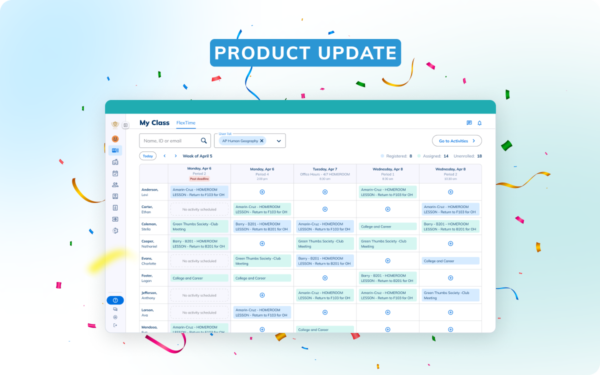
Even with the right placements happening automatically, a classroom teacher still has no way to see where their own students landed. Enrollment View brings flex period visibility directly into My Class, so teachers can see where each of their students is enrolled for upcoming sessions, with unenrolled students clearly flagged, and manage those activities together rather than tracking them separately.
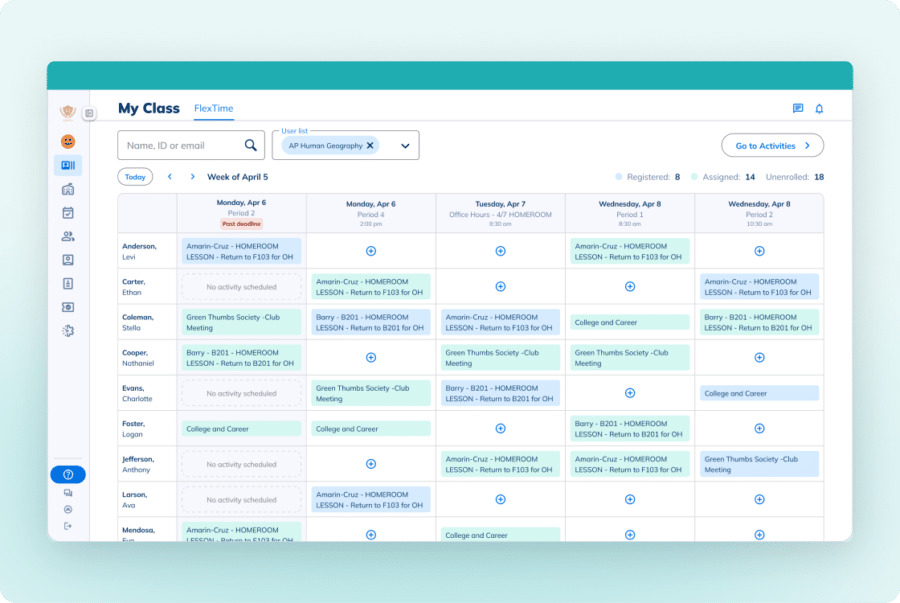
There’s no separate login and no new system to check. It’s the same place teachers already manage hall passes and behavior, now showing flex period placement too. A teacher who notices a student is unenrolled, or in the wrong activity, can catch it before the period starts instead of after.
Setting It Up Once: Multi-Day Cloning
Building a flex schedule by hand, week after week, is a time sink in itself. Multi-Day Cloning is how schools set up their flex schedule efficiently and accurately: admins configure a period once, then copy it, activities and all, across an entire date range in a few clicks, no missed settings, no inconsistencies.
Minga schools already save hours of admin time per semester and see increased intervention attendance. These new features, Period Notifications, Priority Assignments, Automated Registration, and Enrollment View, all build on that existing foundation.
Every Student is Somewhere Meaningful, Without the Manual Work
Together, these features cover the full enrollment lifecycle:
✅ Getting students to sign up on their own
✅ Protecting the seats that matter most
✅ Catching whoever’s left
✅ Giving teachers the visibility to catch anything that slips through anyway
None of it requires more manual coordination than schools are already doing today; in most cases, it requires less.
The result is a flex period system where the right students end up in the right place, consistently, without anyone having to manage every step by hand.
FAQ SECTION
- What is a flex period? A flex period is a dedicated block of time, before, during, or after school, where students attend an intervention or enrichment activity based on their needs or interests.
- How does Minga make sure high-need students get priority? Priority Assignments lets admins designate certain activity categories as priority on specific days. Teachers running Tier 2 intervention sessions can lock students into their session on those days, ensuring intervention placements are guaranteed rather than left to general registration.
- What happens to students who don’t sign up for anything? Automated Registration runs after all other registration methods and places any still-unenrolled students into an available activity, prioritizing a teacher the student already has class with, then their homeroom teacher, then whatever sessions still have room.
- Can teachers see where their students are enrolled? Yes. Enrollment View is built directly into My Class, giving teachers a clear view of where each of their students is placed for upcoming flex periods, with unenrolled students flagged.
- Do schools have to rebuild their flex schedule every week? No. Multi-Day Cloning lets admins set up a flex period once and copy it, activities and all, across an entire date range in a few clicks.