

OFFICE REFERRAL MANAGEMENT
Teachers send the referral with the related behavior attached, plus what they’ve already tried. Admins review and manage every referral from one queue.
Trusted by 2,500+ Schools

How Referral Management Works in Minga
From the first incident in class to a closed referral in the office.
Step 01 of 05
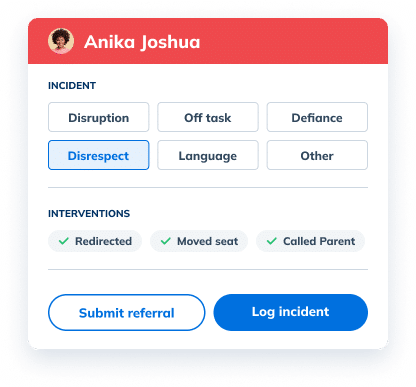
Log incidents as they happen
For classroom-managed behaviors, teachers can log what happened and the interventions they tried, right from My Class.
Step 02 of 05
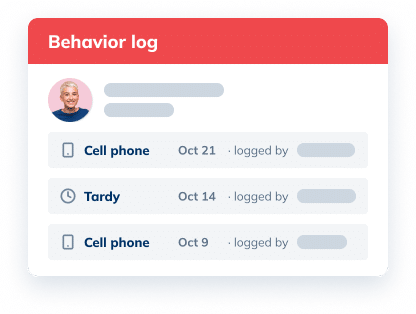
Log behavior in just 3 clicks
Anyone can log a behavior from anywhere in Minga. It tallies every repeat offense, so no one keeps count by hand.
Step 03 of 05
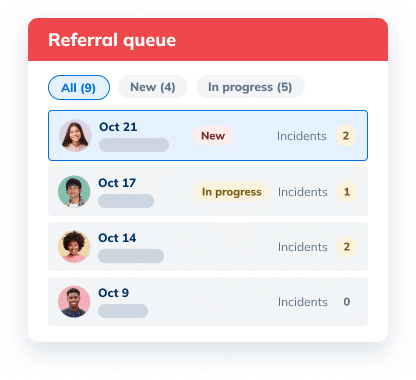
Every referral lands in one queue
Admins see new and in-progress referrals in one inbox, filtered by status or teacher.
Step 04 of 05
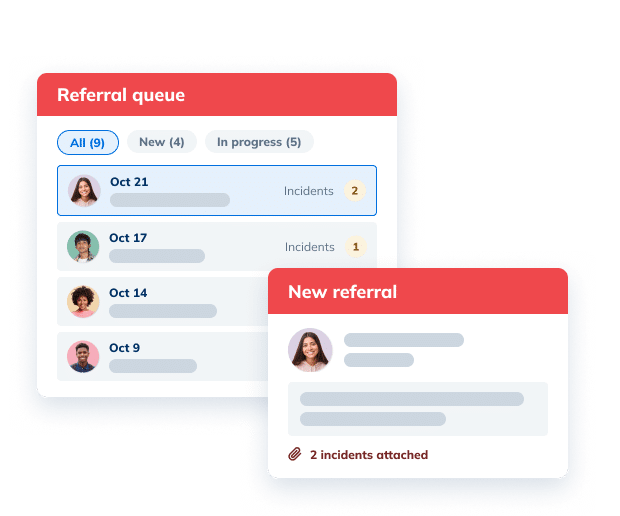
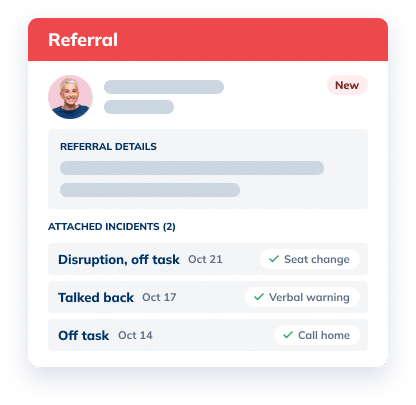
See the full story before you act
Open a referral to read the teacher’s context and every incident attached to it.
Step 05 of 05
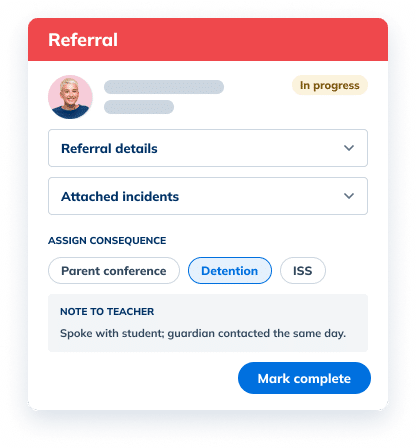
Add notes, assign consequences, mark complete
Assign consequences right from the referral. Status updates and closing notes are shared with teachers automatically. Mark as ‘complete’ to remove it from the queue.
See it in action

A referral is only as useful as the context behind it. With Minga, teachers and staff can attach related incidents and note what’s already been done. Admins set the behaviors and interventions to choose from, so every referral matches how your school talks about behavior. This gives admins what they need to make fair, informed decisions.
Everything a Referral Form Needs, Customized to Your School

Referral details
The teacher’s context for why they’re referring, required on every referral.

Attached incidents
Past incidents sent with the referral, so admins see the pattern.

Interventions tried
What the teacher already did, from a seat change to a call home.

Status updates
Get notified of new referrals, keep track of what’s in progress, and close out cases to remove them from the queue.

Consequences
Assign a consequence right from the referral when one is needed.

Close the loop
Closing notes keep teachers in the loop so they know what happened after they made the referral.
The Difference
Paper Referrals Leave Admins Guessing. Minga Gives the Whole History.
A paper referral arrives with one incident and no history, then disappears into a pile. Minga sends the full record with not only what happened but how it was handled.
| Paper Referrals |
Minga

|
|---|---|
| 0% of a student’s history travels with a paper referral form | 100% of logged incidents ready to attach when a teacher refers |
| One incident on a form, no history | Past incidents attached to every referral |
| What’s already been tried stays in the teacher’s head | Interventions recorded with each incident |
| Referrals piled on a desk or in an inbox | Queue filtered by alpha list |
| Teachers never hear what happened | Status tracked from new to complete |
| Outcomes filed away, if recorded at all | Closing notes saved to reports and profiles |
FAQs – Behavior Referrals
A behavior referral is how a teacher escalates a student’s behavior to an administrator when classroom interventions haven’t worked. In Minga, a referral includes the teacher’s context and any past in-class incidents attached to it, so admins see the full pattern rather than a single moment.
A useful student referral form explains why the teacher is referring, lists the behaviors and incidents involved, and records the interventions already tried. Minga builds that into every referral, then adds admin notes, any consequence assigned, and a closing note once it’s resolved.
Most schools refer when a behavior keeps repeating after classroom interventions, or when an incident is serious enough to need admin involvement. Logging in-class incidents as they happen makes the decision to refer easier, because the pattern and the steps already taken are on record.
An incident is an in-class behavior a teacher logs and handles, with the behaviors, interventions, and a note. A referral escalates the situation to the office. In Minga, a teacher can turn an incident into a referral or attach several past incidents to a new incident.
In Minga, every open referral lands in one admin queue that can be filtered by status or teacher and sorted by date. Admins open a referral, review the attached incidents, add notes, assign a consequence if needed, and complete it with a closing note.
Yes. Each referral moves from ‘new’ to ‘in progress’ to ‘complete’, and teachers can review their own referrals in their referrals report. That way teachers know a referral was handled instead of wondering whether it was ever read.
Admins can assign a consequence directly from a referral, such as a detention, so the record and the decision live in one place. The consequence and the closing note are saved with the referral and appear in the student’s behavior history.
Yes. Admins can choose the behaviors and interventions teachers see on the in-class incident form, and add or remove options to match how your school handles behavior. Referral details are required on every referral, so admins always get the teacher’s context.
Explore More Student Behavior & Discipline Solutions
Log behavior in three clicks.
Set the rules once. Consequences follow.
From consequence to completion.
See patterns and step in early.
Give Every Referral the Full Story
See how Minga connects in-class incidents to office referrals, from the first note to the final outcome.
